
How to make a claim online
1Step one
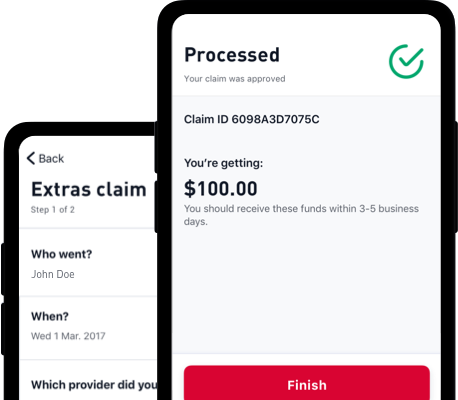
Register or login to My Medibank on our website, or by using the My Medibank App.
2Step two
Select 'Make a claim' and follow the simple instructions to submit your claim.
3Step three
Medibank will then pay any applicable benefits directly into your bank account or send a cheque in the mail.
Want a little more help with your claim?
Our claims guides and information page is here to walk you through claiming for the most common services, like ambulance, health appliances and subscriptions, with simple step-by-step instructions and clear information.
Other ways to make a claim

Membership card
Most extras providers offer the convenience of claiming on the spot using your membership card. All you need is a supported Android or Apple device# and the My Medibank app to tap and claim at extras providers with a HICAPS machine. You can also use a physical membership card.
Post
Send us a letter with your completed claim form and the original invoices or receipts.
In store
Visit us at a Medibank store with your completed claim form and the original invoices or receipts.¹
- Acupuncture
- Antenatal/Postnatal services (includes birthing classes and lactation consultants)
- Chinese Medicine, Exercise Physiology and other Natural Therapies
- Chiropractic
- Clinical Psychology
- Counselling
- Dental
- Dietetics
- Eye Therapy
- Health and extended screening services
- Health appliances and services
- Myotherapy
- Nursing services
- Occupational Therapy
- Optical Items
- Orthodontics
- Osteopathy
- Pharmaceuticals (non-PBS)
- Physiotherapy
- Podiatry
- Remedial Massage
- School accident
- Speech Therapy
- Weight Watchers and health subscriptions
You can also now claim the following online:
- Ambulance services (medically necessary)
- GapCover claims (surgeons, anaesthetists, assistants etc.)
- Hospital accommodation
You can also now claim the following medical services online:
- Diagnostic procedures*
- Therapeutic procedures*
- Oral and Maxilofacial services*
- Cleftlip and cleft palate services*
*May exclude Overseas Worker and Overseas Visitor policy holders. Some claims may be made through the app. Claims can also be submitted offline using one of the methods below.
What claims can't be submitted online?
Depending on your cover, the following claims cannot be submitted online. However, these claims can be submitted offline using one of the methods listed below:
- Claims involving compensation or damages
- Individual claims associated to more than one individual
- Miscellaneous services
How to submit an offline claim:
Send your claim along with the claim form to:
Medibank Private Limited
GPO BOX 2984
MELBOURNE VIC 3001
For extras claims: provide Medibank with your completed claim form and the invoices and/or receipts.
For residential medical claims: lodge the bill with Medicare as a paid, or unpaid claim using the Medicare two-way claim form.
Alternatively, you can make a claim with Medicare, then with us, by providing Medibank with the Medicare Statement of Benefits.
For Overseas Workers or Overseas Visitors Health Cover medical claims: for medical services that can't be claimed online, mail your receipts directly to Medibank with a completed claim form.
For Overseas Student Health Cover claims: please see the OSHC claims page.
Get payments made directly to your bank account using the My Medibank app
Our app makes it easy to register or update your bank details, so you get your benefits faster and deposited straight into your account. Download the app to get started.


After upgrading your cover, waiting periods will only apply for any new services, or for increased benefits or annual limits. If you need to claim during the waiting period, you will receive the same benefits as your previous level of cover, provided you have served all waiting periods on the previous level of cover. Log into the My Medibank app and head to the Out of pocket estimator section to estimate future claim expenses.
Unfortunately, viewing claim information after giving Claim Consent is not available online through My Medibank. To request personal information regarding a claim please contact us.
We take the privacy of our members seriously, and it’s for that reason members are unable to edit financial information for partners, spouses and any dependants over the age of 16. Don’t forget, other members on your policy who are over 16 can create their own My Medibank account and update claim payment details on the go both online and through the app (remember the email address should be different to others on the policy). Get started here.
We take the privacy of our members seriously, and it’s for that reason we only show your limits and those of dependants under the age of 16. Don’t forget, other members on your policy who are over 16 can create their own My Medibank account and view their extras limits on the go both online and through the app (remember the email address should be different to others on the policy). Get started at here.
Some services require extra paperwork, and it is for that reason not all claims can processed electronically. See further up this page for a list of services that are claimable online and a procedure for other services that are required to be claimed with supplementary paperwork.
Currently “Product bonus’” are not visible in My Medibank. Please contact us for assistance regarding limits.
Need help making a claim? Medibank is here to support you.

Things you should know:
1 Claims submitted in store, will be processed separately (at a later date) and pay benefits to you, the hospital or the provider, as appropriate.
2 Some claims, like paper based, may take longer to update.
# To use the My Medibank App and Digital card, you’ll need to be a Medibank health insurance member, running either iOS 16 and above or Android 10.0 and above. If you have Visitors Health Insurance, Working Visa Health Insurance or Overseas Student Health cover, you may not be able to use all the features. If you have multiple policies under your account you will need to select default extras cover to be linked to your digital card. Apple and the Apple logo are trademarks of Apple Inc., registered in the U.S. and other countries. App Store is a service mark of Apple Inc., registered in the U.S. and other countries.
Google Play and the Google Play logo are trademarks of Google Inc.